
Children’s book character sheet generator
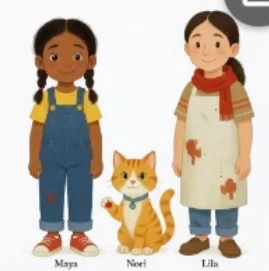
Give each character a visual reference before you illustrate a book. In MyStoryBot, review the lineup first, then use it to check faces, clothing and props as the characters move through different scenes.
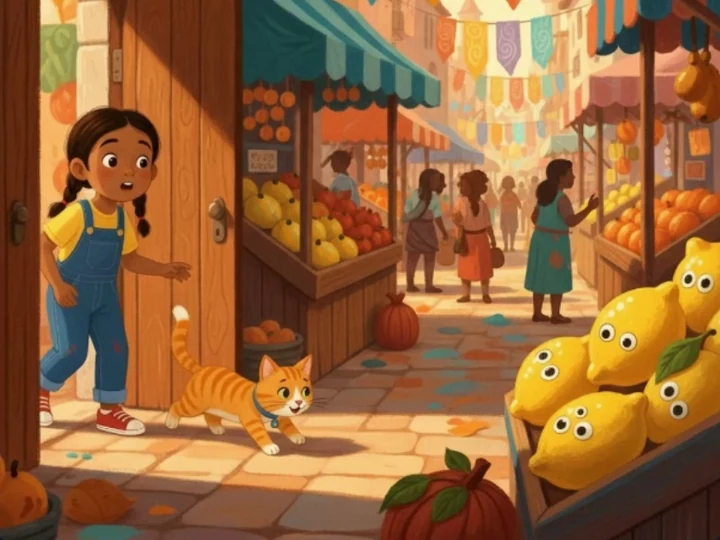
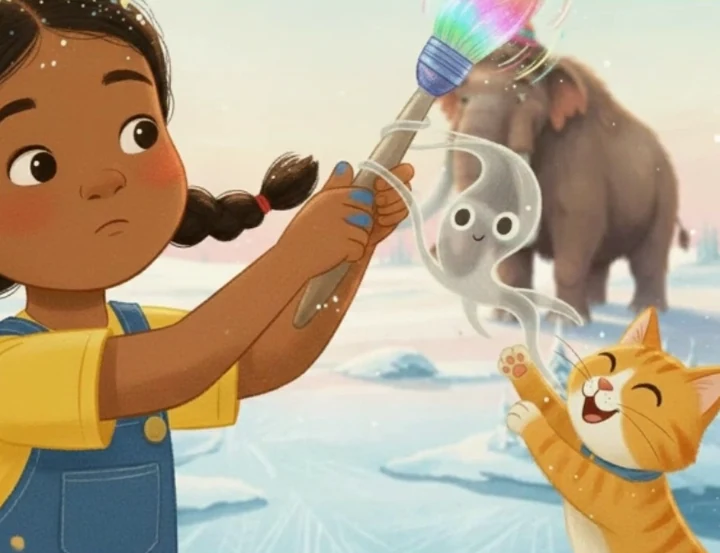
Compare a character sheet with two scenes
These examples come from the MyStoryBot demo for Maya and the Time-Brush. Look for Maya’s yellow shirt, blue overalls and braids, along with the orange cat that follows her.
What to check before you approve a character sheet
- Face and silhouette. Check age cues, hairstyle, proportions and any distinctive markings. The character should be recognizable from farther away as well as in a close-up.
- Clothing and color. Name the main outfit and accessories. If a later scene calls for pajamas or a coat, describe that change and keep distinctive features such as the hairstyle or glasses.
- Props and companions. Give important objects a description that distinguishes them. If a picture changes a prop or a face, describe the correction on that page and compare it with neighboring scenes.
Maya is an eight-year-old with two dark braids, blue denim overalls, a yellow shirt and red sneakers. Her orange tabby has a white chin. Keep those details in close-ups and wide scenes.
Reuse the character in a sequel
Start a new book and choose Reuse from a past story when adding a character reference. Select the existing character artwork, give the new book its own plot, then check the new reference and finished pages against the first book.
For an existing manuscript, see how to bring your text into the illustration workflow. For a page that has already drifted, use the character consistency checklist.