
Turn your child’s drawing into a storybook
A crayon dragon can be the hero of its own book. Upload a photo of the drawing, tell MyStoryBot which details make the character theirs, and decide what happens next. Then review the illustrated pages together.
Drawing to Story Character is included with Author and Pro Author. Creating a new book requires a paid plan.
Keep the details your child drew
In this example, the orange body, pointed red spines and little wings make the dragon recognizable when it moves from a crayon sketch to a storybook illustration.
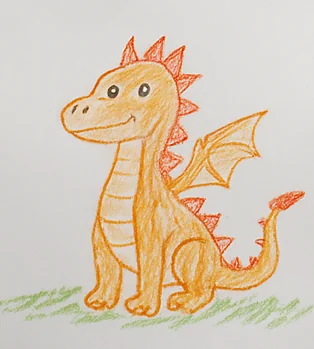
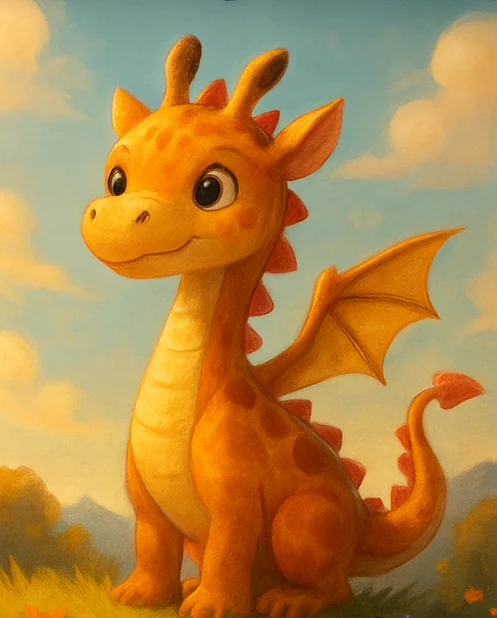
Make a story from a drawing in three steps
- Take a photo in even light. Put the original drawing on a flat surface. Crop around the character and check that its colors and outlines are visible.
- Give the character a name and a problem. Upload the drawing as the character reference. Tell MyStoryBot what to keep and what the character wants to do.
- Check the character before generating the pages. Review the character sheet, then read the finished story together. Edit page text or regenerate an illustration if a detail changes.
Use the orange dragon from my drawing. Keep the red spines, small wings and pointed tail. Her name is Pippa. Write a read-aloud story where she learns to use her tiny flame to guide a lost friend home.
What can you make from the sketch?
Will the character look exactly like the drawing?
The drawing guides the character's look. The chosen art style can change shapes, texture and proportions. Name the details that matter most and review the character and pages before sharing.
Can I use a phone photo of a drawing?
Yes. One clear photo of the sketch is a good starting point. You can also use the in-app sketch tool to draw a character.
Can I print the storybook?
Author includes PDF export. Pro Author adds spread layout and additional publishing and print options. Review the current plan details before you start a book for print.
See a separate finished-book example in the character consistency gallery. Starting with a photo instead? Explore personalized story books with photos.